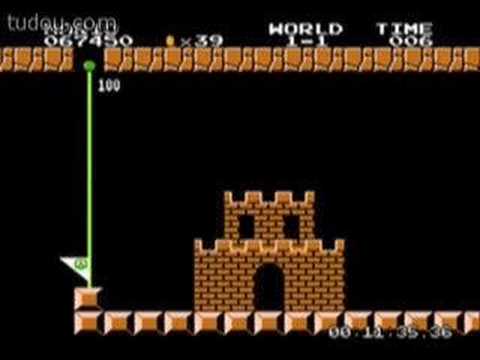
My friend, who is learning programming now asked me how to use C++ to create a video game; well a video game need videos(just kidding), I don't know about how to make a huge game like StarCraft, or Call of Duty or Halo, but I can make a 8bits video game by some idea from my mind.
8bits games are most from old computers or SFC, those video games are very basic programs, and the very important point in those games is MAP.
How to make a 8bits map is a very important part of the video games, you can make a Lunatic map, or a very basic map, but the whole game mainly effected by the map; to make a map, what we should use is Matrix, such as:
int Map[20][560]
But how is that possible to make a map for a video game?
we can see this ex. :
int Map [][5]
{{0,0,0,0,0,0,0,0,0,0,0,0,0,0,0,0,0,0,0,0,0,0,0,0,0,0,0,0},
{0,5,5,0,0,0,0,0,0,1,0,0,2,2,0,0,0,0,3,3,0,3,3,0,0,0,0,0},
{0,0,0,0,0,0,0,0,1,1,0,0,2,2,0,0,0,0,3,6,3,0,0,18,0,0,0,0},
{0,0,0,0,0,0,0,1,1,1,0,0,0,0,0,0,0,0,0,0,0,0,0,18,0,0,0,0},
{1,1,1,1,1,1,1,1,1,1,1,1,1,1,1,1,1,1,1,1,1,1,1,1,1,1,1,1}}
See, this looks kinda like a map, as the result, we can use pics to change those number, we can use lots of 8*8 pics to cover those numbers up, and than a 8 bits map done.
Wednesday, April 25, 2012
Sunday, April 22, 2012
Using C++ to make a Pascal Triangle
/*My friend asked me how to make a Pascal triangle in C++, I helped him but got a little debug problem, but I fix it finally.*/
#include "stdafx.h"
#include <iostream>
using namespace std;
int xnumber(int input)
{
int a=1;
while( input>=2 )/*The number can't be 0, I dont know why, but I this is the number that fix the whole program*/
{
a = input * a ;
//cout<<a<<" ";
input--;
}
return a;
}
int C(int n,int r)
{
int a = n-r;
a = xnumber(n)/(xnumber(r) * xnumber(a));
return a;
}
int _tmain(int argc, _TCHAR* argv[])
{
int a,line=1,lineneeded;
cout<<"Plz write down how many lines U need"<<endl;
cin>>lineneeded;
cout<<"1 "<<endl ;
while(line <= lineneeded)
{
a=1;
cout<<"1 ";
//cout<<line;
while(a <= line)
{
cout<<C(line,a)<<" ";
a++;
}
cout<<endl;
line++;
}
cout<<endl;
system("pause");
return 0;
}
=====================================END===============================
The out put of this program is going to be a pascal triangle, but the input can't higher than 12.
out put:
1
1 1
1 2 1
1 3 3 1
1 4 6 4 1
1 5 10 10 5 1
1 6 15 20 15 6 1
.
.
.
#include "stdafx.h"
#include <iostream>
using namespace std;
int xnumber(int input)
{
int a=1;
while( input>=2 )/*The number can't be 0, I dont know why, but I this is the number that fix the whole program*/
{
a = input * a ;
//cout<<a<<" ";
input--;
}
return a;
}
int C(int n,int r)
{
int a = n-r;
a = xnumber(n)/(xnumber(r) * xnumber(a));
return a;
}
int _tmain(int argc, _TCHAR* argv[])
{
int a,line=1,lineneeded;
cout<<"Plz write down how many lines U need"<<endl;
cin>>lineneeded;
cout<<"1 "<<endl ;
while(line <= lineneeded)
{
a=1;
cout<<"1 ";
//cout<<line;
while(a <= line)
{
cout<<C(line,a)<<" ";
a++;
}
cout<<endl;
line++;
}
cout<<endl;
system("pause");
return 0;
}
=====================================END===============================
The out put of this program is going to be a pascal triangle, but the input can't higher than 12.
out put:
1
1 1
1 2 1
1 3 3 1
1 4 6 4 1
1 5 10 10 5 1
1 6 15 20 15 6 1
.
.
.
Friday, April 20, 2012
Efficient Sorting Methods
The Bubble Sort
Implementation: Beginner
| Description | The bubble sort is one of the simplest methods you can use. This method works well for simple data structures or if the data set to be sorted is more or less sorted. The bubble sort is very inefficient for a general data set. In the bubble sort algorithm, successive sweeps are made through the records to be sorted. During each sweep, the algorithm compares the key to the elements and swaps the elements if they are not in the desired order. Swapping occurs only among consecutive elements of the data structure. As a result, only one element is placed in its sorted place after each sweep. The sorted elements are not needed for comparison in successive sweeps. |
| Pseudocode | For iteration = 0 to (n-1) Begin For I = 0 to (n-1-iteration) Begin If array[I] > array[I+1] then Swap array[I] and array[I+1] End End |
| Code | void CSort::BubbleSort( void ) |
| Analysis |
|
The Selection Sort
Implementation: Beginner
| Description | The selection sort algorithm is based on using the data elements as keys for comparison such that, at the end of each scan, only one data element is placed in the desired sorted position. This algorithm is simple but very inefficient because it does not consider partial or fully sorted lists. In other words, if you have a partial or fully pre-sorted list, the selection sort does the same number of comparisons as it would on a completely random list and does not use any intelligence (unlike the bubble sort) to improve the performance. As a result the, the selection sort does not really lend itself to a best-case scenario. |
| Pseudocode | For iteration = 0 to (n-1) Begin Lowest = iteration For I = iteration+1 to (n-1) Begin If ( array[Lowest] > array[I] ) Lowest = I End Swap array[iteration] and array[lowest] End |
| Code | void CSort::SelectionSort( void ) |
| Analysis |
|
The Quick Sort
Implementation: Expert
| Description | The quick sort is the most efficient internal sort algorithm. Its preformance is largely influence by the choice of the pivot. The quick sort makes use of three strategies:
A quick sort can be implemented in several ways, but the goal of each approach is to select a data element and place it in its proper position (which is referred to as the pivot) so that all the elemets on the left sided of the pivot are less than (or come before) the pivot and all the elements on the right side of the pivot are greater than (or come after) the pivot. The choice of the pivot and the method used to split the array has a big influence on the overall preformance.
|
| Pseudocode |
|
| Code | void CSort::QuickSort( int first, int last ) |
| Analysis |
|
Software comparison:
| Bubble Sort | Selection Sort | Quick Sort | Items | |||
| 39 | 45 | 30 | 29 | 63 | 34 | 10 |
| 98 | 165 | 59 | 60 | 95 | 59 | 20 |
| 149 | 366 | 92 | 82 | 99 | 55 | 30 |
| 204 | 633 | 144 | 135 | 126 | 81 | 40 |
Summary
The key point to remember is that the efficiency of any sorting method strongly depends on the implementation of the method and the actual data the method is sorting. The best way to choose the right sorting method for you needs is to test each method again various types of inputs. In particular, against a sample of the kind of data you intend to sort.
Downloads
Download the following code to test the sorting methods:
Info from: http://www.cpp-home.com/archives/355.html
Wednesday, April 18, 2012
Introduction
C++ is a computer programming language; the father of C++ called C, C is a a general-purpose compute programming language, It created in between 1969 and 1973 by Dennis Ritchie at the Bell Telephone Laboratories for use of Unix.
Back to C++, C had been enhanced in 1983 by Bjarne Stroustrup, it be came C Classes(now called C++), which we known as C++,the different between C and C++ is, C++ adds a new tool, which called Classes;
this is a web that I love,
www.cplusplus.com
I usually use this web for library search.
Back to C++, C had been enhanced in 1983 by Bjarne Stroustrup, it be came C Classes(now called C++), which we known as C++,the different between C and C++ is, C++ adds a new tool, which called Classes;
this is a web that I love,
www.cplusplus.com
I usually use this web for library search.
Subscribe to:
Posts (Atom)

